
I remember the exact moment I realized I was doing it all wrong. I had spent hours pulling data, trying to piece together some semblance of insight from my local SEO efforts. The worst part? I wasn’t even sure if I was tracking the right metrics. It was like trying to hit a moving target blindfolded. That lightbulb moment hit me hard — I needed a better system. Fast forward to today, and I’ve learned that effective local SEO reports are the secret weapon for staying ahead in the game. If you’ve ever felt overwhelmed or confused by your data, you’re not alone. But here’s the good news: with the right strategies, you can turn your reports into a powerful tool that drives concrete results. Today, I’ll guide you through the exact steps I’ve taken to master local SEO tracking, so you can finally see what’s working and what’s not. Ready to ditch the guesswork and start making data work for you? Let’s dive into it.
Why Local SEO Reports Matter More Than Ever in 2025
In the crowded world of local search, standing out is no longer just about keywords and citations. It’s about understanding your audience, tracking your progress, and adapting quickly. And that’s where well-crafted SEO reports come into play. They’re your dashboard, your crystal ball, and your accountability partner all rolled into one. But here’s the catch — not all reports are created equal. In fact, many local businesses are wasting time on data that doesn’t matter, or worse, missing out on crucial insights altogether. Early in my journey, I made the mistake of focusing solely on rankings without considering how Google Business profiles were impacting my visibility. That oversight cost me valuable leads. It wasn’t until I started integrating Google Business analytics and KPI visualization strategies that I truly understood the impact of my efforts. If you’re serious about dominating local search, mastering your reports is the best place to start. Curious how to do it? I’ll show you the proven tactics that have transformed my approach and could do the same for you. Want to learn more about the latest tools and techniques? Check out this comprehensive guide to mastering SEO insights for 2025.
Is Your Data Really Telling the Whole Story?
One mistake I see often — and made myself early on — is relying on surface-level metrics. Rankings look great? Awesome. But if your Google Business profile isn’t converting views into calls or visits, what’s the point? It’s a classic case of confusing activity with results. The key is to focus on meaningful KPIs and visualize them in ways that clearly show progress. That’s why I now use map-based KPI visualization tools and effective maps rank tracking strategies. They help me see exactly where I’m gaining ground and where I need to improve. If you’ve ever felt lost in a sea of confusing numbers, I get it. That’s why I recommend checking out these KPI visualization strategies designed specifically for local SEO success. Trust me, making your data work for you is the difference between guessing and knowing. So, do you find yourself overwhelmed by your current reports? If yes, you’re not alone — but the good news is, it’s fixable. Keep reading, and I’ll show you how.
Set Clear Objectives for Your Reports
Start by defining what success looks like for your local SEO efforts. For instance, I once focused solely on rankings, which led me astray. Instead, I now track conversions from Google Business profile views to actual calls or visits. This shift gave me a clear picture of real growth and proved more actionable. Establish KPIs like local pack visibility, Google Business profile engagement, and local keyword rankings. These will serve as your compass, guiding your report creation and adjustments.
Integrate Google Business Analytics Effectively
Google Business Profile analytics are treasure troves for local SEO. I recommend connecting your profile with tools that can pull in data on views, clicks, calls, and direction requests. I personally used these strategies to maximize insights. This integration helps you see how your profile’s performance correlates with your ranking efforts. For example, I once noticed a spike in calls after optimizing my profile based on analytics data, which directly impacted my business growth.
Leverage Map-Based Rank Tracking for Precision
Rankings matter, but not just in a vacuum. Use map-based tools that visualize your local rankings geographically. For example, I tested these map-based trackers to understand where my competitors were strong and where I had room to grow. It was like switching from a blurry map to a detailed GPS—suddenly, I knew exactly which neighborhoods needed more attention. This data allows you to target local campaigns more precisely, boosting your visibility where it counts.
Create Visual KPI Dashboards
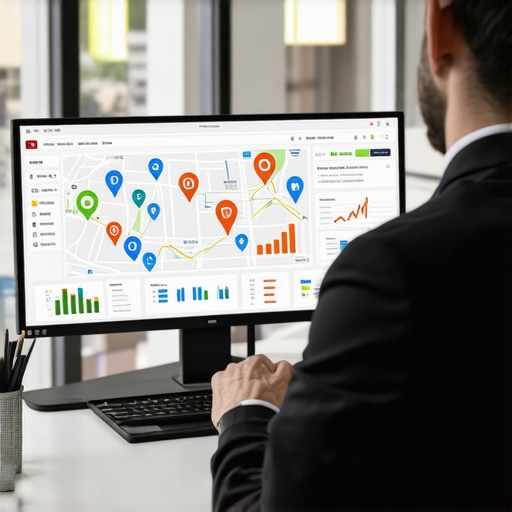
Numbers alone aren’t enough; visuals make insights stick. I built dashboards combining Google Business metrics with rankings data, using tools recommended in these visualization strategies. For instance, mapping your profile views against local rankings side-by-side helped me see patterns—like dips in views coinciding with ranking drops. These visual cues made it easier to adjust tactics quickly instead of sifting through endless spreadsheets.
Automate and Regularly Review Your Data
Consistency is key. I set up automation for weekly reporting, ensuring I always had fresh data without manual effort. This is where SEO reporting software becomes invaluable. For example, I once overlooked a decline in local pack visibility because I wasn’t reviewing data regularly. Automated reports caught the issue early, allowing me to act fast and recover rankings before losing significant traffic.
Test and Refine Your Reporting Methods
Effective reports evolve. I experimented with different visualization tools and KPIs, learning which ones provided the clearest insights. For example, I initially relied on ranking spreadsheets but found mapping-based visuals much more intuitive. As a result, I refined my dashboard to focus on geographically visualized KPIs, making it easier to spot opportunities and threats quickly. Continuous testing ensures your reports remain relevant and insightful.
While many marketers focus on surface-level metrics like rankings and impressions, the real nuance lies in understanding what these numbers truly represent. A common myth is that higher rankings automatically translate into increased revenue, but this isn’t necessarily the case. I’ve seen businesses rank on the first page yet struggle with conversions because their reports don’t account for user engagement or actual customer actions. It’s crucial to look beyond visibility and dive into metrics like click-through rates, call volume, and actual visits. These provide a more comprehensive picture of your local SEO success.
Another frequent mistake is relying solely on Google Business profile insights without integrating broader analytics. Google provides valuable data, but it often omits the bigger picture—such as how users find your site via other channels or how well your local keywords are performing in conjunction with your overall SEO strategy. To truly master your local SEO, you should combine Google Business analytics with other tools, like map-based rank trackers and KPI visualization strategies, to uncover hidden opportunities and avoid blind spots. For instance, I recommend exploring these strategies for a more integrated approach.
Are You Missing the Geographical Nuance in Your Data?
Many overlook the importance of geographic visualization when analyzing local rankings. Simply knowing your overall rank isn’t enough; understanding where you rank in specific neighborhoods or zip codes can reveal critical insights. Map-based tools help visualize your positioning geographically, which can highlight underserved areas or regions where competitors are outpacing you. This advanced nuance can make or break your local SEO campaigns, especially in hyper-local markets. A study by BrightLocal emphasizes that consumers are increasingly making purchase decisions based on proximity and local relevance, making geographic data more crucial than ever.
Make sure your reporting tools incorporate geospatial analysis to avoid the trap of generic, broad-stroke data. If you’re not already doing this, I suggest checking out these map-based rank trackers for a more precise view of your local landscape. By understanding the geographical nuances, you can tailor your strategies to target high-opportunity areas effectively. Have you ever fallen into this trap? Let me know in the comments.
Remember, effective local SEO isn’t just about ranking higher; it’s about understanding your audience’s behavior, geography, and engagement. Avoid the common pitfalls, leverage advanced tools, and continually refine your reports for the best results. For a comprehensive guide on mastering SEO insights in 2025, visit this resource.
Maintaining the accuracy and relevance of your local SEO reports over time is crucial for sustained success. One of my go-to strategies is leveraging dedicated SEO reporting software that automates data collection, visualization, and alerts. I personally rely on these tools because they integrate seamlessly with Google Business Analytics and mapping platforms, reducing manual effort and minimizing errors. Regularly updating your tracking parameters and dashboards ensures you stay aligned with evolving local search algorithms and market dynamics. For example, I set weekly automated reports that highlight changes in local pack visibility and keyword rankings, allowing me to act swiftly on emerging trends.
In addition to automation, periodic audits of your data sources are essential. I recommend revisiting your Google Business insights and cross-referencing them with map-based rank tracking reports. This dual approach helps identify discrepancies, uncover hidden opportunities, and refine your targeting. For instance, I once noticed a decline in profile views that wasn’t reflected in ranking data, prompting me to investigate external factors like reviews or photos that impacted engagement.
Another critical aspect is refining your KPI visualization techniques. Using advanced map-based visualization tools, such as these strategies, has transformed my ability to spot geographic patterns in rankings and engagement. These visuals help identify underserved neighborhoods or regions where competitors are gaining ground, enabling targeted campaigns.
As for future trends, I believe automation and AI-driven insights will become even more sophisticated. Machine learning algorithms will analyze vast datasets to predict ranking fluctuations and suggest proactive adjustments. Staying ahead will require integrating these emerging technologies into your routine, much like how I’ve adopted AI-powered tools for keyword research and competitor analysis.
To keep your local SEO efforts sustainable, I strongly encourage trying out these advanced visualization and automation techniques. They’ve made a tangible difference in my results, and I’m confident they can do the same for you. Don’t forget to regularly review your data sources and stay adaptable to algorithm updates. For a comprehensive deep dive into these methods, visit this guide and start refining your reporting system today.
When I first started tracking my local SEO efforts, I was overwhelmed by the sheer volume of data and the lack of clear insights. That was my wake-up call: to focus on quality over quantity in my reports. I learned the hard way that deep, geo-specific analytics and visual KPIs can transform vague metrics into actionable strategies. If you want to truly master local SEO, embracing these insider lessons will give you an unbeatable edge in 2025 and beyond.
What I Wish I Had Known About Local SEO Reports Sooner
- Don’t just chase rankings—understand the story behind them. Early on, I obsessed over ranking positions without considering how users interacted with my Google Business profile or website. Now I know that real success comes from tracking engagement metrics like calls, direction requests, and conversions, which truly measure growth.
- Geo-visualization reveals hidden opportunities. Using map-based rank tracking tools, I uncovered underserved neighborhoods and adjusted my local campaigns accordingly. This geographic nuance made a tangible difference in my results.
- Automation saves time and prevents mistakes. Setting up automated reports through dedicated SEO software allowed me to catch ranking drops early and respond faster, keeping my local visibility strong without manual effort.
- Combine multiple data sources for a full picture. Relying solely on Google Business insights limited my understanding. Integrating tools like map-based trackers and KPI dashboards gave me a holistic view of my local SEO health.
Tools That Changed My Approach to Local SEO Tracking
- Mastering SEO insights guide: A cornerstone for understanding how to leverage data in 2025 effectively.
- Google Business Analytics tools: Essential for deepening your insights into profile performance and user engagement.
- Map-based rank tracking techniques: Critical for geographic precision and spotting regional opportunities.
- KPI visualization strategies: Turning numbers into visuals that tell the real story of your local SEO progress.
Now It’s Your Turn to Make Data Work for You
Effective local SEO reporting is more than just numbers; it’s about understanding your audience, geography, and engagement on a deeper level. By applying these lessons and tools, you can avoid common pitfalls and unlock new growth opportunities. Remember, the future belongs to those who master their insights today. Ready to revolutionize your local SEO tracking? Dive into this comprehensive guide and start transforming data into results now.
This post really resonated with me, especially the emphasis on geo-visualization and map-based rank tracking. In my own experience, integrating geographic data into local SEO reports has unlocked opportunities in underserved neighborhoods that I previously overlooked. I used to rely solely on traditional ranking tools and missed these hidden gems. The challenge I face now is balancing the depth of data with simplicity for reporting to clients who may not be as tech-savvy. Curious, has anyone found effective ways to simplify geospatial insights without losing critical nuance? Also, automating these processes has been a game changer for me, saving tons of time and reducing errors. It makes me wonder, what are some of the most innovative tools out there for visual KPI dashboards that can integrate multiple data sources seamlessly? I’d love to hear tips from others who’ve refined their system to be both comprehensive and manageable.
This post really highlights the importance of not just collecting data, but understanding and visualizing it effectively. I completely agree that surface-level metrics can be misleading if you’re not digging into engagement and conversion data, especially for local SEO. I’ve been experimenting with map-based visualization tools myself and found they really help clients grasp the geographical nuances of their rankings. However, I sometimes struggle with balancing detailed insights and simplicity in client reports. Has anyone found good ways to communicate complex geospatial data without overwhelming the client or losing critical insights? Also, automating reports has saved me heaps of time as well, especially when I integrate various data sources for a comprehensive view. I’d love to hear about the tools or dashboards others are using to streamline this process while keeping the information clear and actionable.
Reading through this post really made me think about how many local businesses still focus heavily on rankings alone. In my experience, shifting the focus toward real engagement metrics like calls, visits, and conversions has made a huge difference in understanding true local SEO performance. I also found that visualizing data with maps not only helps in identifying underserved areas but also makes it easier to communicate insights to clients who might not be as data-savvy. One challenge I’ve faced is balancing comprehensive geographic data with simplicity in reporting. Has anyone tried blending advanced geospatial insights with straightforward reporting formats? It seems the key is finding clear ways to present maps and KPIs without overwhelming the audience. I’d be interested to hear about tools or techniques that others have used to make complex data both actionable and digestible, especially for small local teams or clients. These insights are definitely game changers for refining ongoing strategies.
This post offers a really comprehensive look at the importance of nuanced data interpretation in local SEO. I remember initially focusing only on rankings, but I quickly learned that without integrating conversion metrics and user engagement data, it’s like flying blind. What really stood out to me was the emphasis on geospatial visualization — I’ve started using map overlays to identify underserved neighborhoods in my area, and the results have been promising. However, one challenge I often face is making these sophisticated insights digestible for clients who aren’t as tech-savvy. Do you or anyone have tips for simplifying complex geographic data into clear, actionable insights without losing critical details? Also, I agree that automation has saved me a ton of time; I recently adopted a dashboard tool that pulls in real-time data from multiple sources, making it much easier to stay on top of trends. I’d love to hear which tools others have had success with for creating visual, easy-to-understand KPI dashboards.
This article hits so many important points, especially about going beyond rankings and focusing on KPIs like calls and visits. I’ve noticed that many local businesses tend to get stuck tracking just their Google rankings without looking at how users actually engage with their profiles. The use of map-based visualizations really appeals to me, as it offers a clear picture of geographic performance. I’ve started experimenting with some of these tools, and it’s amazing how much they reveal about underserved areas. One thing I’ve struggled with is translating detailed geospatial insights into simple reports that clients can easily understand. Has anyone found effective ways to present such complex data visually without overwhelming their audience? I think automating regular data reviews is a game changer, too. I wonder what are some of the best practices in setting up automated KPI dashboards that stay flexible and insightful over time. Would love to hear about others’ experiences and favorite tools for this!